Git Backup
The Git Backup feature automatically backs up Intelligence Hub configuration to a Git repository. The backup is stored as a single JSON file and can be used by Git Deployment Integration.
Manual backups can be performed when the backup mode is set to Manual or Scheduled. During manual or scheduled backups, changes to the hub configuration are pushed to the specified branch of the repository. When there are no changes since the previous backup, no commit is pushed. The commit message differentiates scheduled and manual backups. For manual backups, the Intelligence Hub user must have Settings:execute_write permission and the commit message will contain the user that performed the backup. See Users and Roles for more information.
Git Backup settings support the use of System and Environment references. Changes to System Variables will be detected automatically and cause the Git Backup schedule to be restarted. See System Variables and Environment Variables for more information.
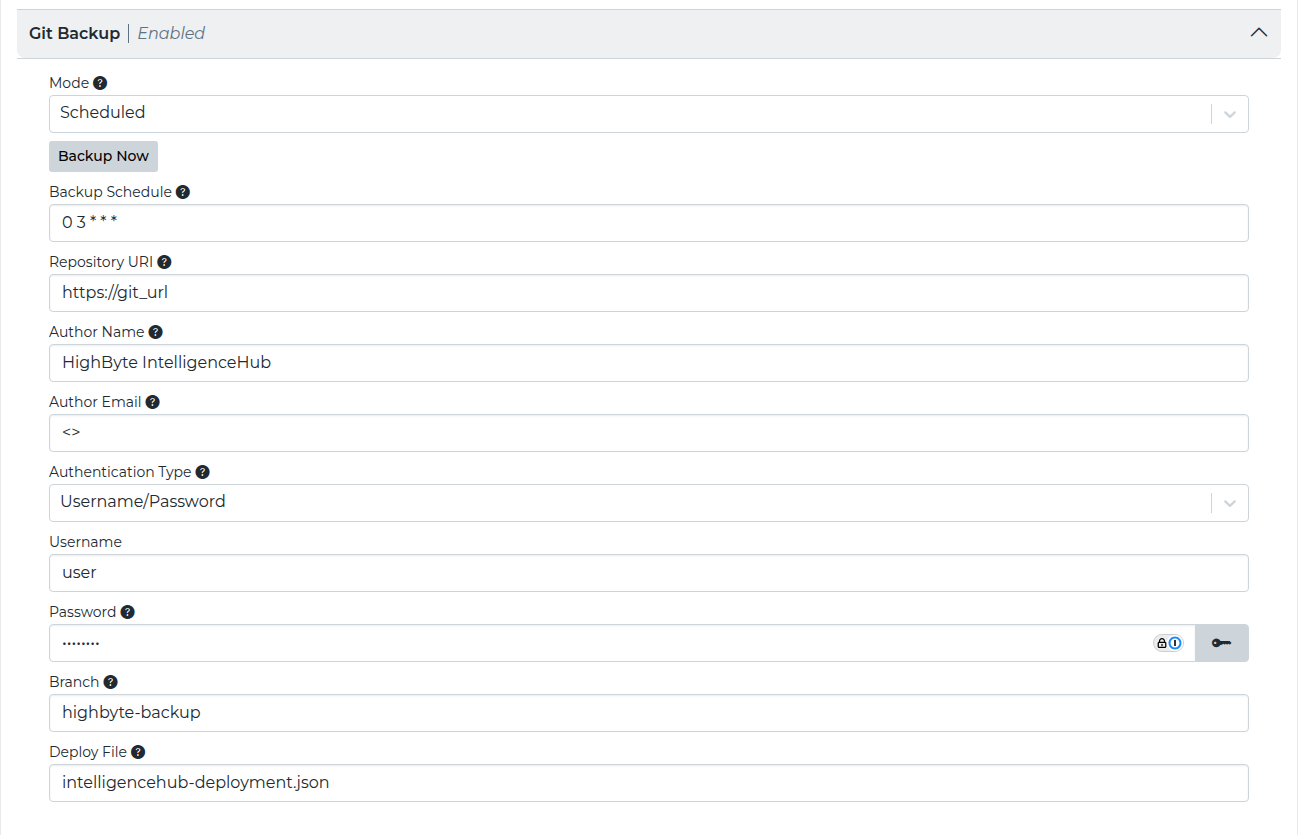
| Setting | JSON Property | Description |
|---|---|---|
| Mode | settings.gitBackup.mode | The mode controls how backups are performed. The following options are available.
|
| Backup Schedule | settings.gitBackup.schedule | The cron schedule to run the backup, no back-up is performed when blank. Default is daily at 3am UTC. |
| Repository URI | settings.gitBackup.repositoryUri | The URI of the Git repository. |
| Author | settings.gitBackup.authorName | Author to use in commit messages. |
settings.gitBackup.authorEmail | Email to use in commit messages. | |
| Type | settings.gitBackup.type | Git (git) is currently the only supported type. |
| Authentication Type | settings.gitBackup.authenticationType | The authentication type. None (none) and Username/Password (pass) are currently supported. |
| Username | settings.gitBackup.username | Git username to use for password authentication. |
| Password | settings.gitBackup.password | Git password (or personal access token) to use for password authentication. |
| Branch | settings.gitBackup.branch | Branch in the repo to use for backup. |
| Deploy File | settings.gitBackup.deployFile | The relative path in the repository to save the configuration. |