Configuration
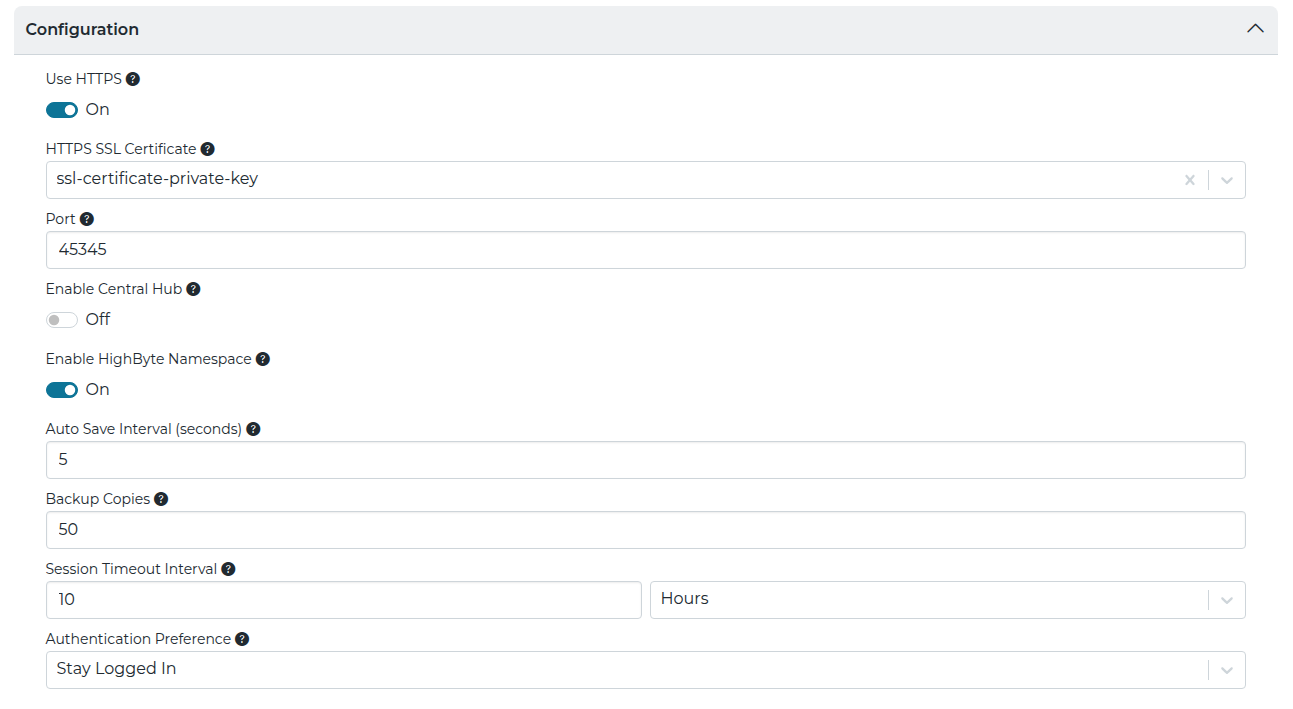
The Configuration section controls the REST-based configuration API, auto-save behavior, backup settings, and central hub capabilities.
| Setting | JSON Property | Description |
|---|---|---|
| Use HTTPS | settings.configuration.scheme | Specifies whether the REST-based configuration API should be exposed via http or https. |
| HTTPS SSL Certificate | settings.configuration.schemeCertificate | Specifies the certificate used for https. |
| Port | settings.configuration.port | Specifies which HTTP/HTTPS port the REST-based configuration API listens on. |
| Enable Central Hub | settings.configuration.centralConfig | Specifies if the hub is in central hub mode, allowing it to be used to remotely configure and read Namespace data from other hubs. Set to true to enable this capability. The default setting is false. |
| Enable HighByte Namespace | settings.configuration.highByteNamespace | Automatically populates the Namespaces HighByte node and children with project references when set to On (enabled). The HighByte node and children are not populated when set to Off(disabled). This setting is enabled by default. For more details, see also: Namespaces |
| Auto Save Interval | settings.configuration.autoSaveIntervalSeconds | Specifies the maximum interval in seconds that the configuration file is saved after a configuration change is made. Defaults to 60 seconds. The minimum is 5 seconds and the maximum is 3600 seconds (1 hour). |
| Backup Copies | settings.configuration.backupCopies | Specifies the maximum number of configuration copies to backup. The default is 50. The minimum value is 0 (no backups) and the maximum is 100. When enabled, a ‘backups’ directory is created in the application directory. The existing configuration file is copied to the backup directory prior to saving any new changes to the configuration. If the maximum backups already exist, the oldest backup (based on the last time the file was modified) is deleted from the backup directory. |
| Session Timeout Interval | settings.configuration.sessionTimeoutInterval | Specifies the amount of time a session is valid for. Use 0 for no timeout. This timeout applies to users authenticated for the Configuration, REST Data Server, and MCP Server. |
| Authentication Preference | settings.configuration.authenticationPreference | Specifies whether users should be asked to authenticate every time they navigate to the UI.