REST
The REST Data server exposes an API to interact with industrial data, providing access to applications that need to make requests for data on demand. The API exposes connection inputs and outputs and instances as well as pipelines.
Pipelines provide a way to build out your own API, where each Pipeline can perform specific operations, like getting machine state, retrieving historical data, changing set points, etc. This is a powerful approach, as the API can remain the same between multiple factories, but the pipeline plumbing can change depending on the specific solutions in each factory. For example, maybe CreateWorkOrder in one factory routes to Maximo’s REST interface and in another interacts with SQL.
Configure the REST Data Server
Configure the HTTP Server
To enable the REST Data server, first configure the HTTP Server:
- Go to Settings under Manage in the main menu
- Enable HTTPS (recommended). By default, this will use a self-signed certificate
- Keep Allow Anonymous disabled unless you’d like read only operations like getting the list of available pipelines to not require login
- Leave Allow Login Authentication disabled unless you’d like to enable the use of username/password based authentication. We recommend using the default bearer token authentication

Enable the REST Data Server
- Go to Settings under Manage in the main menu
- Enable the REST Data Server

API Documentation
The easiest way to explore the API is by opening the swagger documentation using default URL http://localhost:8885/data/doc once the REST Data Server is enabled. A bearer token will be required to test some of the exposed endpoints, see Server Authentication for details on creating the token.
Custom Endpoints
On the REST Data page, you can create custom REST endpoints that call a specified pipeline. Each endpoint defines a request path and example JSON Body schema. All endpoints are created as POST requests.
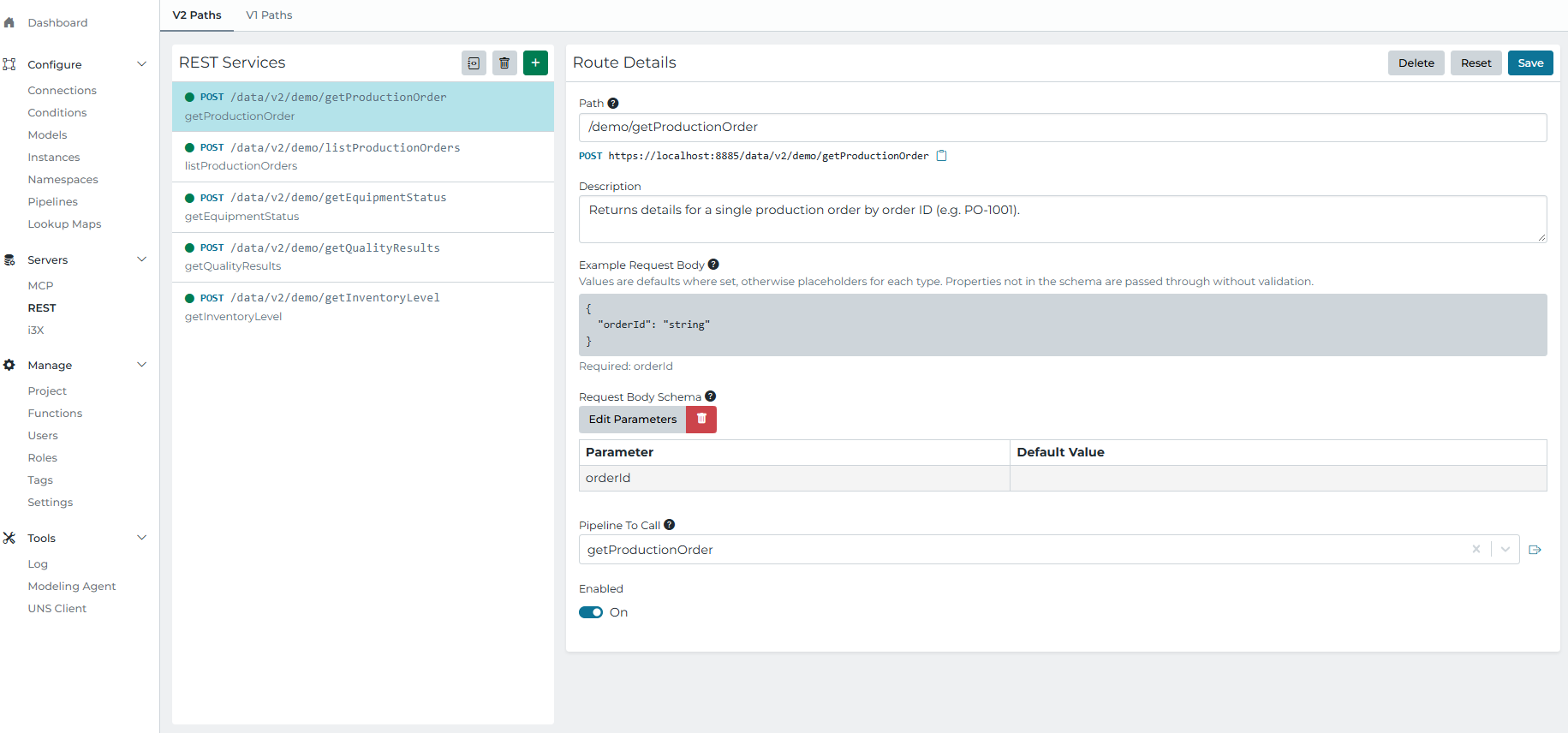
| Setting | Description |
|---|---|
| Path | The path appended to the REST Data Server URL. |
| Description | A description of the endpoint. |
| Example Request Body | An example JSON request body, including defaults or placeholders for schema properties. |
| Request Body Schema | The request parameters and their default values. Properties not in the schema pass through without validation. |
| Pipeline To Call | The pipeline invoked when the endpoint is requested. Include a Return stage in the pipeline to send response data back to the caller. |
| Enabled | Whether the endpoint is available to receive requests. |
.SystemTrigger with the source set to REST.Controlling HTTP Response Codes
In some cases it’s important to control the HTTP response code returned to the caller. To do this use a Transform stage and set the event metadata as shown.
Note that Return stages will return 200 by default, and pipeline errors will return 400.
