Size Buffer
The Size Buffer stage is used to accumulate a max number of events and then emit all the events as an array. This is helpful in examples where you’re sampling source data at a high frequency but the target system is more efficient when processing chunks at a time.
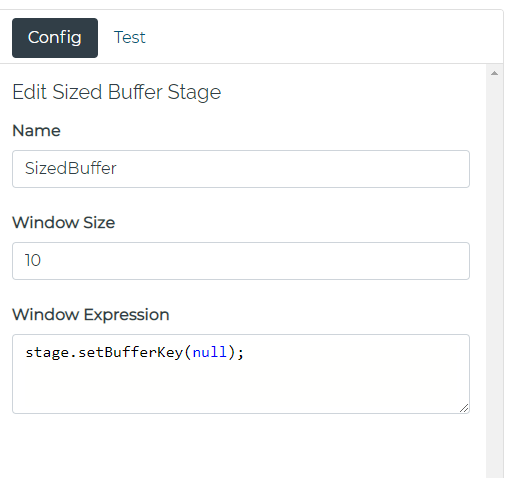
Window Size
Number of values to accumulate into the buffer before emitting the values to the next stage(s).
Timeout
In some cases you may want to accumulate N events or emit after Y period of time. Setting the Timeout will emit the buffer after Y period of time if it hasn’t already hit the Window Size. Every time the buffer emits the Timeout is reset. When set to zero, there is no timeout.
Window Expression
The Window Expression splits incoming events into separate buffers based on a key. Without a Window Expression, every event that reaches the stage goes into one shared buffer. With a Window Expression, events that produce the same key are grouped together, and events with different keys never share a buffer. For example, you could create a buffer per Instance name, per asset, or per Model type.
The expression is JavaScript that runs once for each incoming event. It has access to the event object (including event.name, event.value, and event.metadata) and calls stage.setBufferKey(key) to choose the buffer the event is added to.
- By default the Window Expression is empty, which places every event in a single buffer. Calling
stage.setBufferKey(null)has the same effect. - Any other key creates (or reuses) a buffer for that key. A new buffer is created the first time a key is seen.
- Each buffer has its own Window Size and Timeout and emits independently. When the buffer for one key fills, only the events for that key are emitted.
Example: One buffer per source
A pipeline triggered by several instances sends all of their events into the same stage. To keep each instance’s events in its own array, key the buffer on the source name.
stage.setBufferKey(event.name)
With a Window Size of 10, the stage emits an array of 10 events for Line1 once ten Line1 events arrive, and separately emits an array of 10 events for Line2 once ten Line2 events arrive. The two buffers fill at their own rate.
Example: Key on a value attribute
When the grouping information is inside the payload, read it from event.value. The example below creates one buffer per asset.
stage.setBufferKey(event.value.assetId)
Example: Key on metadata
Keys can also come from metadata set by the trigger or an earlier stage, such as a Breakup index or a pipeline parameter.
stage.setBufferKey(event.metadata.siteId)
Example: Combine several fields
To group by more than one field, build a single string key from each field.
stage.setBufferKey(`${event.value.site}/${event.value.line}`)
Tips
- Keys are strings. Convert numbers or other types before passing them in, for example
stage.setBufferKey(String(event.value.lineNumber)). - Choose a key with a limited set of values. A key that is different for nearly every event, such as a timestamp, creates a new buffer for almost every event, so events are rarely grouped together.
- If the field used for the key can be missing, provide a fallback so those events still land in a predictable buffer, for example
stage.setBufferKey(event.value.assetId ?? "unknown").
See the JavaScript stage for the full list of event and stage properties available in expressions.